

Track how People Also Ask boxes change over time
Save any keyword. PeopleAlsoAsked snapshots every People Also Ask question Google shows — daily, weekly, or monthly — and shows you exactly what changed and when, so you're never caught off-guard by a shifting SERP.
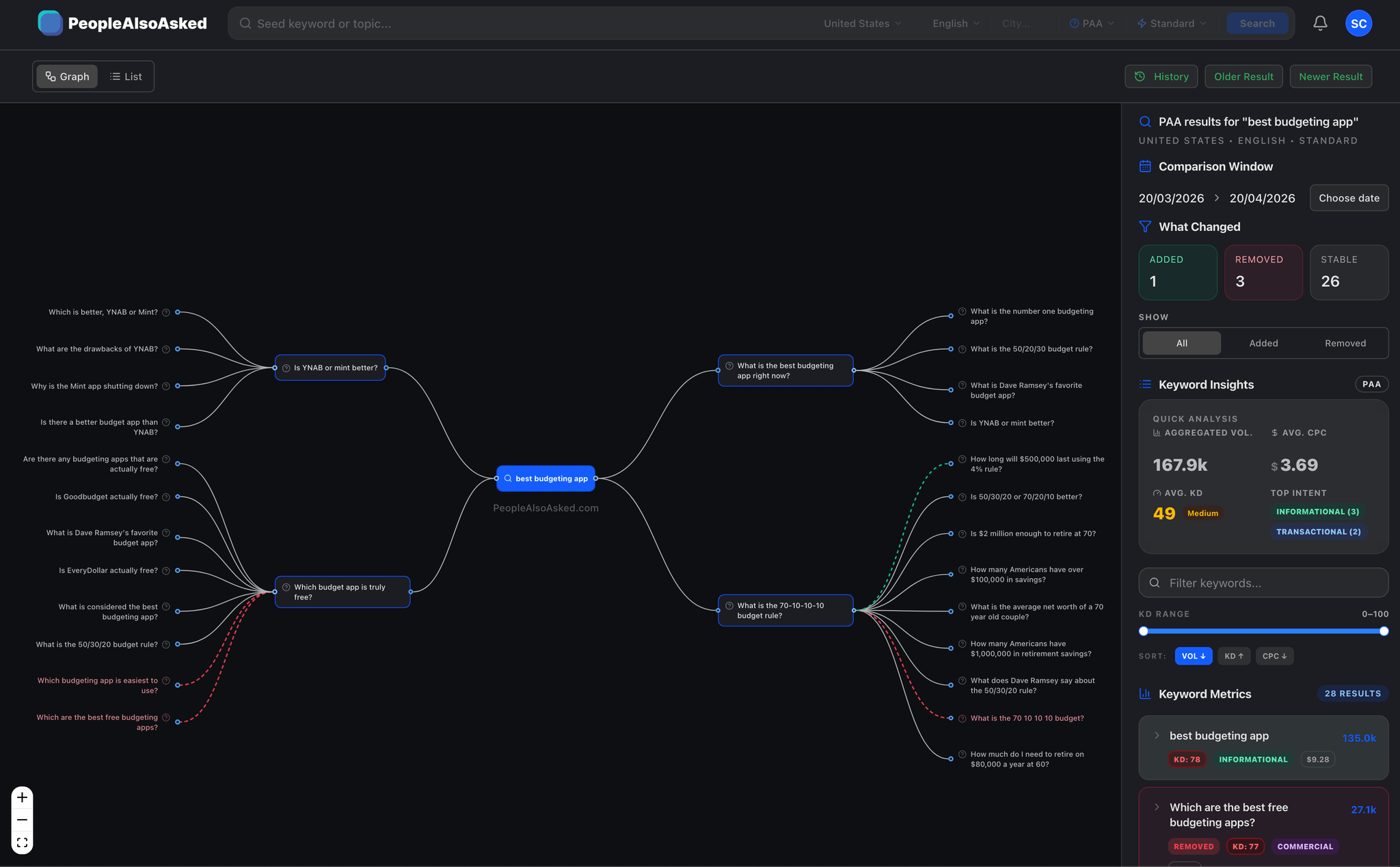
What exactly is People Also Ask tracking?
PAA tracking means automatically monitoring Google's "People Also Ask" box for your target keywords over time. Instead of manually searching and trying to remember what was there last week, a tracker takes timestamped snapshots and highlights every change: new questions, removed questions, and shifts in which websites Google chooses to answer them.
Scheduled snapshots
Capture PAA results daily, weekly, or monthly. Every snapshot is stored so you can compare any two points in time.
Visual diffs
See exactly which questions appeared, disappeared, or stayed the same between any two snapshots.
Domain monitoring
Watch specific domains to see when they appear or disappear as PAA answer sources for your keywords.
Preview comparison
Compare how the actual PAA box looked at two different points in time, side by side.
The questions Google shows are constantly shifting
Catch new PAA opportunities the day they appear
Google adds and removes PAA questions constantly. Tracking lets you spot new questions before your competitors notice them, giving you a window to create content that wins the answer box.
Protect your existing PAA placements
If your site is currently answering a PAA question, you need to know the moment it disappears. Domain monitoring alerts you instantly when your URL is dropped from a PAA answer.
Track competitor visibility inside PAA boxes
Add competitor domains to your watchlist and see exactly which PAA questions they own. When a competitor appears or disappears, you know immediately and can plan your response.
Prove PAA impact with before/after evidence
Show clients and stakeholders exactly how the PAA landscape shifted after your content campaign. Timestamped snapshots and visual diffs make the impact undeniable.
Automated alerts when anything changes
Set it and forget it. Get email notifications when a new question appears, an old one drops, or a watched domain gains or loses a PAA placement.
Track PAA changes across countries and languages
PAA results vary dramatically by locale. Set up separate tracking schedules per country and language to monitor regional shifts independently.
The teams that track PAA move before everyone else
Monitor PAA answers for your brand keywords
Monitor your brand keywords daily to catch the moment a competitor takes over a PAA answer you used to own. Use the diff history to correlate PAA changes with algorithm updates and content publishes.
Set daily tracking on your top 50 brand keywords
Get alerted when a competitor domain appears in your PAA answers
Correlate PAA changes with Google core updates using the timeline
Use domain monitoring to track your own site across all tracked keywords
Track PAA wins across client campaigns
Set up PAA tracking for every client keyword set. Use before/after diffs as concrete proof of campaign impact in monthly reports. Domain monitoring shows clients exactly when their site gained or lost a PAA placement.
Track client keywords and competitor keywords in separate watchlists
Include PAA diff screenshots in monthly client reports
Prove ROI by showing domain appearances gained after content campaigns
Bulk import keyword lists via CSV for faster onboarding
Discover new PAA questions for content briefs
Use PAA tracking to discover which new questions Google is surfacing for your topics. Every new question is a content brief waiting to be written. Track changes monthly to keep your editorial calendar aligned with what users are actually asking.
Track seed keywords monthly to spot new content opportunities
Use new PAA questions as ready-made H2s and FAQ additions
Find gaps where no quality answer exists yet for a new question
Feed PAA changes into your AI workflow for faster brief generation
From keyword to ongoing PAA intelligence
Search any keyword
Enter your keyword and choose your target country and language. Run a live PAA search to see current results.
Set your tracking schedule
Choose daily, weekly, or monthly snapshots. We capture every PAA question, the answering URL, and the full preview text.
Compare any two snapshots
Pick any two dates and get an instant diff. New questions in green, removed in red. See exactly what shifted.
Get alerted to changes
Set alerts for new questions, removed questions, or domain appearances/disappearances. Notifications via email.
Stop guessing what changed. Start seeing it.
Manual checks, no history, no proof
Manually Google your keyword and scan the PAA box
Try to remember what questions appeared last time
No record of which sites were answering what
Miss new questions for days or weeks
No way to prove PAA changes to clients
Automated, instant diffs, clear alerts
Snapshots run on your schedule, no manual work
Side-by-side diff shows every addition and removal
Full answer-source tracking with URL-level history
Instant alerts the moment any question changes
Exportable before/after reports for client evidence
People Also Ask tracking is the process of monitoring the "People Also Ask" box in Google search results over time. Instead of manually checking Google to see which questions appear for your keywords, a PAA tracker automatically takes snapshots at regular intervals (daily, weekly, or monthly) and shows you exactly what changed between any two points in time. This includes new questions that appeared, old questions that were removed, and which websites Google is using to answer each question.
Google constantly updates PAA boxes based on user behaviour, new content being published, algorithm updates, and seasonal trends. A question that appears today might be replaced next week if Google finds a better answer source or if user search patterns shift. Tracking these changes gives you real-time insight into how Google perceives your topic and which content is winning.
Traditional rank tracking tells you where your URL sits in the organic results (position 1, position 5, etc.). People Also Ask tracking tells you something different: which questions Google is associating with your keyword, and which websites are being chosen to answer those questions. You can rank #1 organically but not appear in any PAA answer, or you can appear in PAA without ranking in the top 10. They measure different dimensions of visibility.
Domain monitoring lets you "watch" specific domains (your own site, competitor sites, or any URL) and get alerted whenever that domain appears or disappears as a PAA answer source. For example, if your competitor suddenly starts answering 3 new PAA questions for your target keyword, domain monitoring catches that immediately.
You choose the frequency: daily, weekly, or monthly. Daily snapshots capture the most granular changes but use more credits. Weekly is the most popular choice for ongoing monitoring. Monthly works well for broad trend analysis across large keyword sets.
Yes. The preview comparison shows you how the actual PAA box looked at two different points in time, displayed side by side. You can see not just which questions changed, but how the answer text and source URLs shifted. This is useful for understanding whether Google is serving a different snippet from your page or has replaced your content entirely.
People Also Ask tracking is available on all paid plans. Starter lets you track up to 5 keywords, while Pro and Agency include unlimited tracked keywords with daily snapshots.
Turn new PAA questions into new traffic.
Every PAA question is a ranking opportunity. Track them as they appear, create content before your competitors do, and capture the traffic while the SERP is still thin.